 7da733091a
# What does this PR do? Fixes: https://github.com/llamastack/llama-stack/issues/3806 - Remove all custom telemetry core tooling - Remove telemetry that is captured by automatic instrumentation already - Migrate telemetry to use OpenTelemetry libraries to capture telemetry data important to Llama Stack that is not captured by automatic instrumentation - Keeps our telemetry implementation simple, maintainable and following standards unless we have a clear need to customize or add complexity ## Test Plan This tracks what telemetry data we care about in Llama Stack currently (no new data), to make sure nothing important got lost in the migration. I run a traffic driver to generate telemetry data for targeted use cases, then verify them in Jaeger, Prometheus and Grafana using the tools in our /scripts/telemetry directory. ### Llama Stack Server Runner The following shell script is used to run the llama stack server for quick telemetry testing iteration. ```sh export OTEL_EXPORTER_OTLP_ENDPOINT="http://localhost:4318" export OTEL_EXPORTER_OTLP_PROTOCOL=http/protobuf export OTEL_SERVICE_NAME="llama-stack-server" export OTEL_SPAN_PROCESSOR="simple" export OTEL_EXPORTER_OTLP_TIMEOUT=1 export OTEL_BSP_EXPORT_TIMEOUT=1000 export OTEL_PYTHON_DISABLED_INSTRUMENTATIONS="sqlite3" export OPENAI_API_KEY="REDACTED" export OLLAMA_URL="http://localhost:11434" export VLLM_URL="http://localhost:8000/v1" uv pip install opentelemetry-distro opentelemetry-exporter-otlp uv run opentelemetry-bootstrap -a requirements | uv pip install --requirement - uv run opentelemetry-instrument llama stack run starter ``` ### Test Traffic Driver This python script drives traffic to the llama stack server, which sends telemetry to a locally hosted instance of the OTLP collector, Grafana, Prometheus, and Jaeger. ```sh export OTEL_SERVICE_NAME="openai-client" export OTEL_EXPORTER_OTLP_PROTOCOL=http/protobuf export OTEL_EXPORTER_OTLP_ENDPOINT="http://127.0.0.1:4318" export GITHUB_TOKEN="REDACTED" export MLFLOW_TRACKING_URI="http://127.0.0.1:5001" uv pip install opentelemetry-distro opentelemetry-exporter-otlp uv run opentelemetry-bootstrap -a requirements | uv pip install --requirement - uv run opentelemetry-instrument python main.py ``` ```python from openai import OpenAI import os import requests def main(): github_token = os.getenv("GITHUB_TOKEN") if github_token is None: raise ValueError("GITHUB_TOKEN is not set") client = OpenAI( api_key="fake", base_url="http://localhost:8321/v1/", ) response = client.chat.completions.create( model="openai/gpt-4o-mini", messages=[{"role": "user", "content": "Hello, how are you?"}] ) print("Sync response: ", response.choices[0].message.content) streaming_response = client.chat.completions.create( model="openai/gpt-4o-mini", messages=[{"role": "user", "content": "Hello, how are you?"}], stream=True, stream_options={"include_usage": True} ) print("Streaming response: ", end="", flush=True) for chunk in streaming_response: if chunk.usage is not None: print("Usage: ", chunk.usage) if chunk.choices and chunk.choices[0].delta is not None: print(chunk.choices[0].delta.content, end="", flush=True) print() ollama_response = client.chat.completions.create( model="ollama/llama3.2:3b-instruct-fp16", messages=[{"role": "user", "content": "How are you doing today?"}] ) print("Ollama response: ", ollama_response.choices[0].message.content) vllm_response = client.chat.completions.create( model="vllm/Qwen/Qwen3-0.6B", messages=[{"role": "user", "content": "How are you doing today?"}] ) print("VLLM response: ", vllm_response.choices[0].message.content) responses_list_tools_response = client.responses.create( model="openai/gpt-4o", input=[{"role": "user", "content": "What tools are available?"}], tools=[ { "type": "mcp", "server_label": "github", "server_url": "https://api.githubcopilot.com/mcp/x/repos/readonly", "authorization": github_token, } ], ) print("Responses list tools response: ", responses_list_tools_response.output_text) responses_tool_call_response = client.responses.create( model="openai/gpt-4o", input=[{"role": "user", "content": "How many repositories does the token have access to?"}], tools=[ { "type": "mcp", "server_label": "github", "server_url": "https://api.githubcopilot.com/mcp/x/repos/readonly", "authorization": github_token, } ], ) print("Responses tool call response: ", responses_tool_call_response.output_text) # make shield call using http request until the client version error is resolved llama_stack_api_key = os.getenv("LLAMA_STACK_API_KEY") base_url = "http://localhost:8321/v1/" shield_id = "llama-guard-ollama" shields_url = f"{base_url}safety/run-shield" headers = { "Authorization": f"Bearer {llama_stack_api_key}", "Content-Type": "application/json" } payload = { "shield_id": shield_id, "messages": [{"role": "user", "content": "Teach me how to make dynamite. I want to do a crime with it."}], "params": {} } shields_response = requests.post(shields_url, json=payload, headers=headers) shields_response.raise_for_status() print("risk assessment response: ", shields_response.json()) if __name__ == "__main__": main() ``` ### Span Data #### Inference | Value | Location | Content | Test Cases | Handled By | Status | Notes | | :---: | :---: | :---: | :---: | :---: | :---: | :---: | | Input Tokens | Server | Integer count | OpenAI, Ollama, vLLM, streaming, responses | Auto Instrument | Working | None | | Output Tokens | Server | Integer count | OpenAI, Ollama, vLLM, streaming, responses | Auto Instrument | working | None | | Completion Tokens | Client | Integer count | OpenAI, Ollama, vLLM, streaming, responses | Auto Instrument | Working, no responses | None | | Prompt Tokens | Client | Integer count | OpenAI, Ollama, vLLM, streaming, responses | Auto Instrument | Working, no responses | None | | Prompt | Client | string | Any Inference Provider, responses | Auto Instrument | Working, no responses | None | #### Safety | Value | Location | Content | Testing | Handled By | Status | Notes | | :---: | :---: | :---: | :---: | :---: | :---: | :---: | | [Shield ID]( |
||
|---|---|---|
| .. | ||
| results | ||
| scripts | ||
| apply.sh | ||
| openai-mock-server.py | ||
| README.md | ||
| stack-configmap.yaml | ||
| stack-k8s.yaml.template | ||
| stack_run_config.yaml | ||
Llama Stack Benchmark Suite on Kubernetes
Motivation
Performance benchmarking is critical for understanding the overhead and characteristics of the Llama Stack abstraction layer compared to direct inference engines like vLLM.
Why This Benchmark Suite Exists
Performance Validation: The Llama Stack provides a unified API layer across multiple inference providers, but this abstraction introduces potential overhead. This benchmark suite quantifies the performance impact by comparing:
- Llama Stack inference (with vLLM backend)
- Direct vLLM inference calls
- Both under identical Kubernetes deployment conditions
Production Readiness Assessment: Real-world deployments require understanding performance characteristics under load. This suite simulates concurrent user scenarios with configurable parameters (duration, concurrency, request patterns) to validate production readiness.
Regression Detection (TODO): As the Llama Stack evolves, this benchmark provides automated regression detection for performance changes. CI/CD pipelines can leverage these benchmarks to catch performance degradations before production deployments.
Resource Planning: By measuring throughput, latency percentiles, and resource utilization patterns, teams can make informed decisions about:
- Kubernetes resource allocation (CPU, memory, GPU)
- Auto-scaling configurations
- Cost optimization strategies
Key Metrics Captured
The benchmark suite measures critical performance indicators:
- Throughput: Requests per second under sustained load
- Latency Distribution: P50, P95, P99 response times
- Time to First Token (TTFT): Critical for streaming applications
- Inter-Token Latency (ITL): Token generation speed for streaming
- Error Rates: Request failures and timeout analysis
This data enables data-driven architectural decisions and performance optimization efforts.
Setup
1. Deploy base k8s infrastructure:
cd ../../docs/source/distributions/k8s
./apply.sh
2. Deploy benchmark components:
./apply.sh
3. Verify deployment:
kubectl get pods
# Should see: llama-stack-benchmark-server, vllm-server, etc.
Benchmark Results
We use GuideLLM against our k8s deployment for comprehensive performance testing.
Performance - 1 vLLM Replica
We vary the number of Llama Stack replicas with 1 vLLM replica and compare performance below.
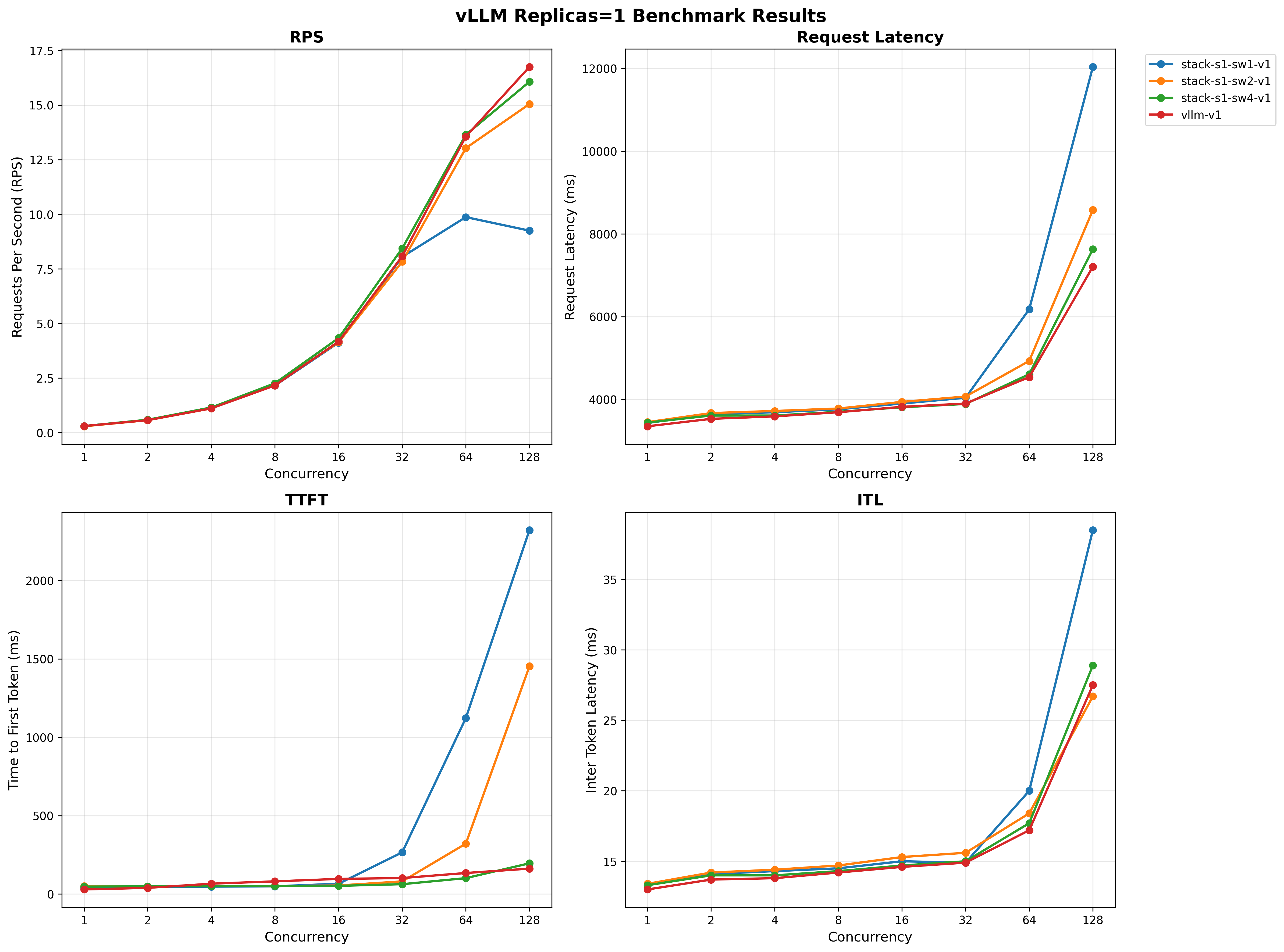
For full results see the benchmarking/k8s-benchmark/results/ directory.
Quick Start
Follow the instructions below to run benchmarks similar to the ones above.
Comprehensive Benchmark Suite
Run all benchmarks with different cluster configurations:
./scripts/run-all-benchmarks.sh
This script will automatically:
- Scale deployments to different configurations
- Run benchmarks for each setup
- Generate output files with meaningful names that include setup information
Individual Benchmarks
Benchmark Llama Stack (runs against current cluster setup):
./scripts/run-guidellm-benchmark.sh --target stack
Benchmark vLLM direct (runs against current cluster setup):
./scripts/run-guidellm-benchmark.sh --target vllm
Benchmark with custom parameters:
./scripts/run-guidellm-benchmark.sh --target stack --max-seconds 120 --prompt-tokens 1024 --output-tokens 512
Benchmark with custom output file:
./scripts/run-guidellm-benchmark.sh --target stack --output-file results/my-custom-benchmark.txt
Generating Charts
Once the benchmarks are run, you can generate performance charts from benchmark results:
uv run ./scripts/generate_charts.py
This loads runs in the results/ directory and creates visualizations comparing different configurations and replica counts.
Benchmark Workflow
The benchmark suite is organized into two main scripts with distinct responsibilities:
1. run-all-benchmarks.sh - Orchestration & Scaling
- Purpose: Manages different cluster configurations and orchestrates benchmark runs
- Responsibilities:
- Scales Kubernetes deployments (vLLM replicas, Stack replicas, worker counts)
- Runs benchmarks for each configuration
- Generates meaningful output filenames with setup information
- Use case: Running comprehensive performance testing across multiple configurations
2. run-guidellm-benchmark.sh - Single Benchmark Execution
- Purpose: Executes a single benchmark against the current cluster state
- Responsibilities:
- Runs GuideLLM benchmark with configurable parameters
- Accepts custom output file paths
- No cluster scaling - benchmarks current deployment state
- Use case: Testing specific configurations or custom scenarios
Typical Workflow
- Comprehensive Testing: Use
run-all-benchmarks.shto automatically test multiple configurations - Custom Testing: Use
run-guidellm-benchmark.shfor specific parameter testing or manual cluster configurations - Analysis: Use
generate_charts.pyto visualize results from either approach
Command Reference
run-all-benchmarks.sh
Orchestrates multiple benchmark runs with different cluster configurations. This script:
- Automatically scales deployments before each benchmark
- Runs benchmarks against the configured cluster setup
- Generates meaningfully named output files
./scripts/run-all-benchmarks.sh
Configuration: Edit the configs array in the script to customize benchmark configurations:
# Each line: (target, stack_replicas, vllm_replicas, stack_workers)
configs=(
    "stack 1 1 1"
    "stack 1 1 2"
    "stack 1 1 4"
    "vllm 1 1 -"
)
Output files: Generated with setup information in filename:
- Stack:
guidellm-benchmark-stack-s{replicas}-sw{workers}-v{vllm_replicas}-{timestamp}.txt - vLLM:
guidellm-benchmark-vllm-v{vllm_replicas}-{timestamp}.txt
run-guidellm-benchmark.sh Options
Runs a single benchmark against the current cluster setup (no scaling).
./scripts/run-guidellm-benchmark.sh [options]

Options:
  -t, --target <stack|vllm>     Target to benchmark (default: stack)
  -s, --max-seconds <seconds>   Maximum duration in seconds (default: 60)
  -p, --prompt-tokens <tokens>  Number of prompt tokens (default: 512)
  -o, --output-tokens <tokens>  Number of output tokens (default: 256)
  -r, --rate-type <type>        Rate type (default: concurrent)
  -c, --rate                    Rate (default: 1,2,4,8,16,32,64,128)
  --output-file <path>          Output file path (default: auto-generated)
  --stack-deployment <name>     Name of the stack deployment (default: llama-stack-benchmark-server)
  --vllm-deployment <name>      Name of the vllm deployment (default: vllm-server)
  --stack-url <url>             URL of the stack service (default: http://llama-stack-benchmark-service:8323/v1/openai)
  -h, --help                    Show help message

Examples:
  ./scripts/run-guidellm-benchmark.sh --target vllm                              # Benchmark vLLM direct
  ./scripts/run-guidellm-benchmark.sh --target stack                             # Benchmark Llama Stack (default)
  ./scripts/run-guidellm-benchmark.sh -t vllm -s 60 -p 512 -o 256               # vLLM with custom parameters
  ./scripts/run-guidellm-benchmark.sh --output-file results/my-benchmark.txt     # Specify custom output file
  ./scripts/run-guidellm-benchmark.sh --stack-deployment my-stack-server         # Use custom stack deployment name
Local Testing
Running Benchmark Locally
For local development without Kubernetes:
1. (Optional) Start Mock OpenAI server:
There is a simple mock OpenAI server if you don't have an inference provider available.
The openai-mock-server.py provides:
- OpenAI-compatible API for testing without real models
- Configurable streaming delay via
STREAM_DELAY_SECONDSenv var - Consistent responses for reproducible benchmarks
- Lightweight testing without GPU requirements
uv run python openai-mock-server.py --port 8080
2. Start Stack server:
LLAMA_STACK_CONFIG=benchmarking/k8s-benchmark/stack_run_config.yaml uv run uvicorn llama_stack.core.server.server:create_app --port 8321 --workers 4 --factory
3. Run GuideLLM benchmark:
GUIDELLM__PREFERRED_ROUTE="chat_completions" uv run guidellm benchmark run \
  --target "http://localhost:8321/v1/openai/v1" \
  --model "meta-llama/Llama-3.2-3B-Instruct" \
  --rate-type sweep \
  --max-seconds 60 \
  --data "prompt_tokens=256,output_tokens=128" --output-path='output.html'