 98a5047f9d
# What does this PR do? <!-- Provide a short summary of what this PR does and why. Link to relevant issues if applicable. --> This PR is responsible for attaching prompts to storage stores in run configs. It allows to specify prompts as stores in different distributions. The need of this functionality was initiated in #3514 > Note, #3514 is divided on three separate PRs. Current PR is the first of three. <!-- If resolving an issue, uncomment and update the line below --> <!-- Closes #[issue-number] --> ## Test Plan <!-- Describe the tests you ran to verify your changes with result summaries. *Provide clear instructions so the plan can be easily re-executed.* --> Manual testing and updated CI unit tests Prerequisites: 1. `uv run --with llama-stack llama stack list-deps starter | xargs -L1 uv pip install` 2. `llama stack run starter ` ``` INFO 2025-10-23 15:36:17,387 llama_stack.cli.stack.run:100 cli: Using run configuration: /Users/ianmiller/llama-stack/llama_stack/distributions/starter/run.yaml INFO 2025-10-23 15:36:17,423 llama_stack.cli.stack.run:157 cli: HTTPS enabled with certificates: Key: None Cert: None INFO 2025-10-23 15:36:17,424 llama_stack.cli.stack.run:159 cli: Listening on ['::', '0.0.0.0']:8321 INFO 2025-10-23 15:36:17,749 llama_stack.core.server.server:521 core::server: Run configuration: INFO 2025-10-23 15:36:17,756 llama_stack.core.server.server:524 core::server: apis: - agents - batches - datasetio - eval - files - inference - post_training - safety - scoring - tool_runtime - vector_io image_name: starter providers: agents: - config: persistence: agent_state: backend: kv_default namespace: agents responses: backend: sql_default max_write_queue_size: 10000 num_writers: 4 table_name: responses provider_id: meta-reference provider_type: inline::meta-reference batches: - config: kvstore: backend: kv_default namespace: batches provider_id: reference provider_type: inline::reference datasetio: - config: kvstore: backend: kv_default namespace: datasetio::huggingface provider_id: huggingface provider_type: remote::huggingface - config: kvstore: backend: kv_default namespace: datasetio::localfs provider_id: localfs provider_type: inline::localfs eval: - config: kvstore: backend: kv_default namespace: eval provider_id: meta-reference provider_type: inline::meta-reference files: - config: metadata_store: backend: sql_default table_name: files_metadata storage_dir: /Users/ianmiller/.llama/distributions/starter/files provider_id: meta-reference-files provider_type: inline::localfs inference: - config: api_key: '********' url: https://api.fireworks.ai/inference/v1 provider_id: fireworks provider_type: remote::fireworks - config: api_key: '********' url: https://api.together.xyz/v1 provider_id: together provider_type: remote::together - config: {} provider_id: bedrock provider_type: remote::bedrock - config: api_key: '********' base_url: https://api.openai.com/v1 provider_id: openai provider_type: remote::openai - config: api_key: '********' provider_id: anthropic provider_type: remote::anthropic - config: api_key: '********' provider_id: gemini provider_type: remote::gemini - config: api_key: '********' url: https://api.groq.com provider_id: groq provider_type: remote::groq - config: api_key: '********' url: https://api.sambanova.ai/v1 provider_id: sambanova provider_type: remote::sambanova - config: {} provider_id: sentence-transformers provider_type: inline::sentence-transformers post_training: - config: checkpoint_format: meta provider_id: torchtune-cpu provider_type: inline::torchtune-cpu safety: - config: excluded_categories: [] provider_id: llama-guard provider_type: inline::llama-guard - config: {} provider_id: code-scanner provider_type: inline::code-scanner scoring: - config: {} provider_id: basic provider_type: inline::basic - config: {} provider_id: llm-as-judge provider_type: inline::llm-as-judge - config: openai_api_key: '********' provider_id: braintrust provider_type: inline::braintrust tool_runtime: - config: api_key: '********' max_results: 3 provider_id: brave-search provider_type: remote::brave-search - config: api_key: '********' max_results: 3 provider_id: tavily-search provider_type: remote::tavily-search - config: {} provider_id: rag-runtime provider_type: inline::rag-runtime - config: {} provider_id: model-context-protocol provider_type: remote::model-context-protocol vector_io: - config: persistence: backend: kv_default namespace: vector_io::faiss provider_id: faiss provider_type: inline::faiss - config: db_path: /Users/ianmiller/.llama/distributions/starter/sqlite_vec.db persistence: backend: kv_default namespace: vector_io::sqlite_vec provider_id: sqlite-vec provider_type: inline::sqlite-vec registered_resources: benchmarks: [] datasets: [] models: [] scoring_fns: [] shields: [] tool_groups: - provider_id: tavily-search toolgroup_id: builtin::websearch - provider_id: rag-runtime toolgroup_id: builtin::rag vector_stores: [] server: port: 8321 storage: backends: kv_default: db_path: /Users/ianmiller/.llama/distributions/starter/kvstore.db type: kv_sqlite sql_default: db_path: /Users/ianmiller/.llama/distributions/starter/sql_store.db type: sql_sqlite stores: conversations: backend: sql_default table_name: openai_conversations inference: backend: sql_default max_write_queue_size: 10000 num_writers: 4 table_name: inference_store metadata: backend: kv_default namespace: registry prompts: backend: kv_default namespace: prompts telemetry: enabled: true vector_stores: default_embedding_model: model_id: nomic-ai/nomic-embed-text-v1.5 provider_id: sentence-transformers default_provider_id: faiss version: 2 INFO 2025-10-23 15:36:20,032 llama_stack.providers.utils.inference.inference_store:74 inference: Write queue disabled for SQLite to avoid concurrency issues WARNING 2025-10-23 15:36:20,422 llama_stack.providers.inline.telemetry.meta_reference.telemetry:84 telemetry: OTEL_EXPORTER_OTLP_ENDPOINT is not set, skipping telemetry INFO 2025-10-23 15:36:22,379 llama_stack.providers.utils.inference.openai_mixin:436 providers::utils: OpenAIInferenceAdapter.list_provider_model_ids() returned 105 models INFO 2025-10-23 15:36:22,703 uvicorn.error:84 uncategorized: Started server process [17328] INFO 2025-10-23 15:36:22,704 uvicorn.error:48 uncategorized: Waiting for application startup. INFO 2025-10-23 15:36:22,706 llama_stack.core.server.server:179 core::server: Starting up Llama Stack server (version: 0.3.0) INFO 2025-10-23 15:36:22,707 llama_stack.core.stack:470 core: starting registry refresh task INFO 2025-10-23 15:36:22,708 uvicorn.error:62 uncategorized: Application startup complete. INFO 2025-10-23 15:36:22,708 uvicorn.error:216 uncategorized: Uvicorn running on http://['::', '0.0.0.0']:8321 (Press CTRL+C to quit) ``` As you can see, prompts are attached to stores in config Testing: 1. Create prompt: ``` curl -X POST http://localhost:8321/v1/prompts \ -H "Content-Type: application/json" \ -d '{ "prompt": "Hello {{name}}! You are working at {{company}}. Your role is {{role}} at {{company}}. Remember, {{name}}, to be {{tone}}.", "variables": ["name", "company", "role", "tone"] }' ``` `{"prompt":"Hello {{name}}! You are working at {{company}}. Your role is {{role}} at {{company}}. Remember, {{name}}, to be {{tone}}.","version":1,"prompt_id":"pmpt_a90e09e67acfe23776f2778c603eb6c17e139dab5f6e163f","variables":["name","company","role","tone"],"is_default":false}% ` 2. Get prompt: `curl -X GET http://localhost:8321/v1/prompts/pmpt_a90e09e67acfe23776f2778c603eb6c17e139dab5f6e163f` `{"prompt":"Hello {{name}}! You are working at {{company}}. Your role is {{role}} at {{company}}. Remember, {{name}}, to be {{tone}}.","version":1,"prompt_id":"pmpt_a90e09e67acfe23776f2778c603eb6c17e139dab5f6e163f","variables":["name","company","role","tone"],"is_default":false}% ` 3. Query sqlite KV storage to check created prompt: ``` sqlite> .mode column sqlite> .headers on sqlite> SELECT * FROM kvstore WHERE key LIKE 'prompts:v1:%'; key value expiration ------------------------------------------------------------ ------------------------------------------------------------ ---------- prompts:v1:pmpt_a90e09e67acfe23776f2778c603eb6c17e139dab5f6e {"prompt_id": "pmpt_a90e09e67acfe23776f2778c603eb6c17e139dab 163f:1 5f6e163f", "prompt": "Hello {{name}}! You are working at {{c ompany}}. Your role is {{role}} at {{company}}. Remember, {{ name}}, to be {{tone}}.", "version": 1, "variables": ["name" , "company", "role", "tone"], "is_default": false} prompts:v1:pmpt_a90e09e67acfe23776f2778c603eb6c17e139dab5f6e 1 163f:default sqlite> ``` |
||
|---|---|---|
| .. | ||
| results | ||
| scripts | ||
| apply.sh | ||
| openai-mock-server.py | ||
| README.md | ||
| stack-configmap.yaml | ||
| stack-k8s.yaml.template | ||
| stack_run_config.yaml | ||
Llama Stack Benchmark Suite on Kubernetes
Motivation
Performance benchmarking is critical for understanding the overhead and characteristics of the Llama Stack abstraction layer compared to direct inference engines like vLLM.
Why This Benchmark Suite Exists
Performance Validation: The Llama Stack provides a unified API layer across multiple inference providers, but this abstraction introduces potential overhead. This benchmark suite quantifies the performance impact by comparing:
- Llama Stack inference (with vLLM backend)
- Direct vLLM inference calls
- Both under identical Kubernetes deployment conditions
Production Readiness Assessment: Real-world deployments require understanding performance characteristics under load. This suite simulates concurrent user scenarios with configurable parameters (duration, concurrency, request patterns) to validate production readiness.
Regression Detection (TODO): As the Llama Stack evolves, this benchmark provides automated regression detection for performance changes. CI/CD pipelines can leverage these benchmarks to catch performance degradations before production deployments.
Resource Planning: By measuring throughput, latency percentiles, and resource utilization patterns, teams can make informed decisions about:
- Kubernetes resource allocation (CPU, memory, GPU)
- Auto-scaling configurations
- Cost optimization strategies
Key Metrics Captured
The benchmark suite measures critical performance indicators:
- Throughput: Requests per second under sustained load
- Latency Distribution: P50, P95, P99 response times
- Time to First Token (TTFT): Critical for streaming applications
- Inter-Token Latency (ITL): Token generation speed for streaming
- Error Rates: Request failures and timeout analysis
This data enables data-driven architectural decisions and performance optimization efforts.
Setup
1. Deploy base k8s infrastructure:
cd ../../docs/source/distributions/k8s
./apply.sh
2. Deploy benchmark components:
./apply.sh
3. Verify deployment:
kubectl get pods
# Should see: llama-stack-benchmark-server, vllm-server, etc.
Benchmark Results
We use GuideLLM against our k8s deployment for comprehensive performance testing.
Performance - 1 vLLM Replica
We vary the number of Llama Stack replicas with 1 vLLM replica and compare performance below.
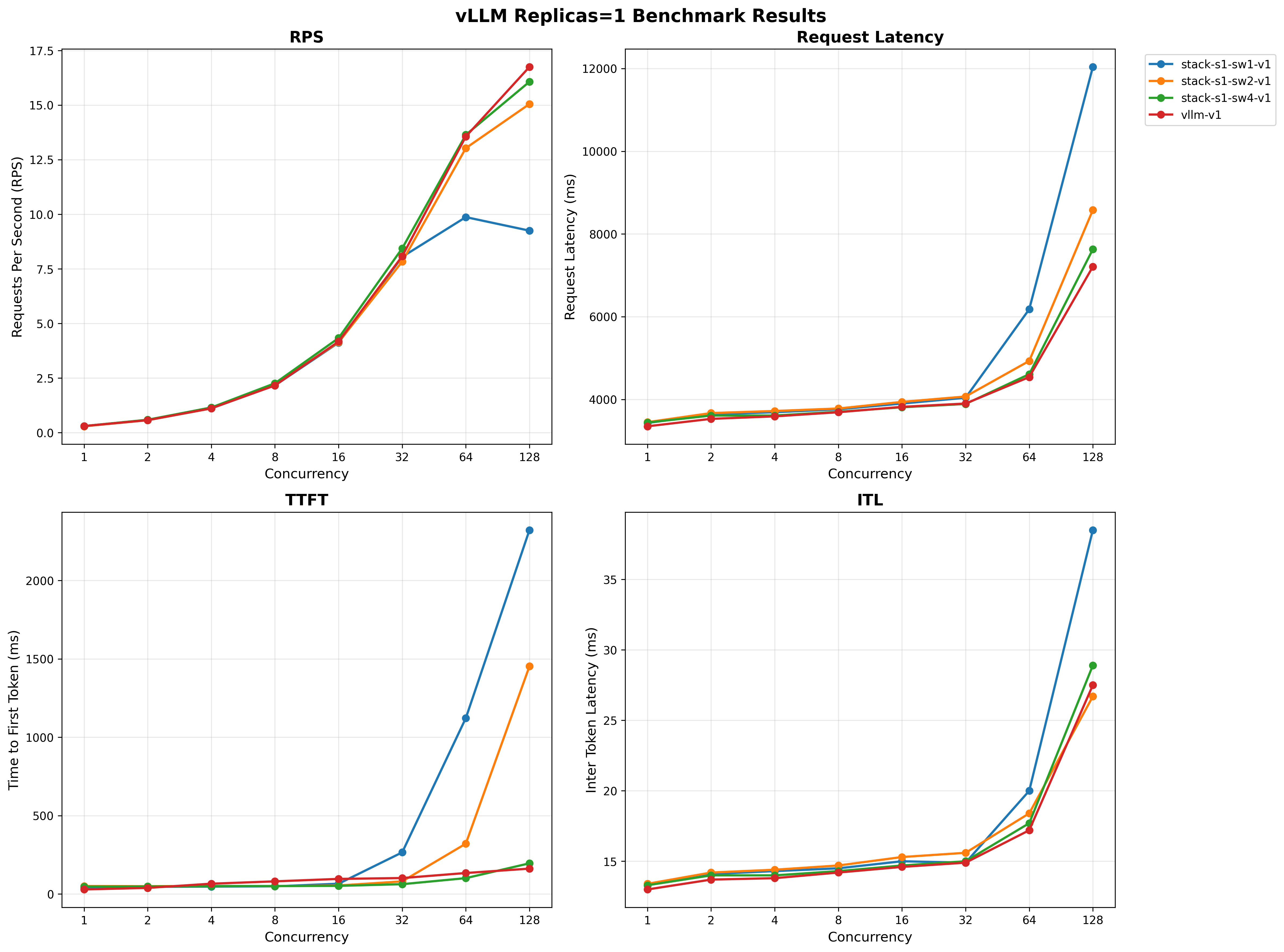
For full results see the benchmarking/k8s-benchmark/results/ directory.
Quick Start
Follow the instructions below to run benchmarks similar to the ones above.
Comprehensive Benchmark Suite
Run all benchmarks with different cluster configurations:
./scripts/run-all-benchmarks.sh
This script will automatically:
- Scale deployments to different configurations
- Run benchmarks for each setup
- Generate output files with meaningful names that include setup information
Individual Benchmarks
Benchmark Llama Stack (runs against current cluster setup):
./scripts/run-guidellm-benchmark.sh --target stack
Benchmark vLLM direct (runs against current cluster setup):
./scripts/run-guidellm-benchmark.sh --target vllm
Benchmark with custom parameters:
./scripts/run-guidellm-benchmark.sh --target stack --max-seconds 120 --prompt-tokens 1024 --output-tokens 512
Benchmark with custom output file:
./scripts/run-guidellm-benchmark.sh --target stack --output-file results/my-custom-benchmark.txt
Generating Charts
Once the benchmarks are run, you can generate performance charts from benchmark results:
uv run ./scripts/generate_charts.py
This loads runs in the results/ directory and creates visualizations comparing different configurations and replica counts.
Benchmark Workflow
The benchmark suite is organized into two main scripts with distinct responsibilities:
1. run-all-benchmarks.sh - Orchestration & Scaling
- Purpose: Manages different cluster configurations and orchestrates benchmark runs
- Responsibilities:
- Scales Kubernetes deployments (vLLM replicas, Stack replicas, worker counts)
- Runs benchmarks for each configuration
- Generates meaningful output filenames with setup information
- Use case: Running comprehensive performance testing across multiple configurations
2. run-guidellm-benchmark.sh - Single Benchmark Execution
- Purpose: Executes a single benchmark against the current cluster state
- Responsibilities:
- Runs GuideLLM benchmark with configurable parameters
- Accepts custom output file paths
- No cluster scaling - benchmarks current deployment state
- Use case: Testing specific configurations or custom scenarios
Typical Workflow
- Comprehensive Testing: Use
run-all-benchmarks.shto automatically test multiple configurations - Custom Testing: Use
run-guidellm-benchmark.shfor specific parameter testing or manual cluster configurations - Analysis: Use
generate_charts.pyto visualize results from either approach
Command Reference
run-all-benchmarks.sh
Orchestrates multiple benchmark runs with different cluster configurations. This script:
- Automatically scales deployments before each benchmark
- Runs benchmarks against the configured cluster setup
- Generates meaningfully named output files
./scripts/run-all-benchmarks.sh
Configuration: Edit the configs array in the script to customize benchmark configurations:
# Each line: (target, stack_replicas, vllm_replicas, stack_workers)
configs=(
    "stack 1 1 1"
    "stack 1 1 2"
    "stack 1 1 4"
    "vllm 1 1 -"
)
Output files: Generated with setup information in filename:
- Stack:
guidellm-benchmark-stack-s{replicas}-sw{workers}-v{vllm_replicas}-{timestamp}.txt - vLLM:
guidellm-benchmark-vllm-v{vllm_replicas}-{timestamp}.txt
run-guidellm-benchmark.sh Options
Runs a single benchmark against the current cluster setup (no scaling).
./scripts/run-guidellm-benchmark.sh [options]

Options:
  -t, --target <stack|vllm>     Target to benchmark (default: stack)
  -s, --max-seconds <seconds>   Maximum duration in seconds (default: 60)
  -p, --prompt-tokens <tokens>  Number of prompt tokens (default: 512)
  -o, --output-tokens <tokens>  Number of output tokens (default: 256)
  -r, --rate-type <type>        Rate type (default: concurrent)
  -c, --rate                    Rate (default: 1,2,4,8,16,32,64,128)
  --output-file <path>          Output file path (default: auto-generated)
  --stack-deployment <name>     Name of the stack deployment (default: llama-stack-benchmark-server)
  --vllm-deployment <name>      Name of the vllm deployment (default: vllm-server)
  --stack-url <url>             URL of the stack service (default: http://llama-stack-benchmark-service:8323/v1/openai)
  -h, --help                    Show help message

Examples:
  ./scripts/run-guidellm-benchmark.sh --target vllm                              # Benchmark vLLM direct
  ./scripts/run-guidellm-benchmark.sh --target stack                             # Benchmark Llama Stack (default)
  ./scripts/run-guidellm-benchmark.sh -t vllm -s 60 -p 512 -o 256               # vLLM with custom parameters
  ./scripts/run-guidellm-benchmark.sh --output-file results/my-benchmark.txt     # Specify custom output file
  ./scripts/run-guidellm-benchmark.sh --stack-deployment my-stack-server         # Use custom stack deployment name
Local Testing
Running Benchmark Locally
For local development without Kubernetes:
1. (Optional) Start Mock OpenAI server:
There is a simple mock OpenAI server if you don't have an inference provider available.
The openai-mock-server.py provides:
- OpenAI-compatible API for testing without real models
- Configurable streaming delay via
STREAM_DELAY_SECONDSenv var - Consistent responses for reproducible benchmarks
- Lightweight testing without GPU requirements
uv run python openai-mock-server.py --port 8080
2. Start Stack server:
LLAMA_STACK_CONFIG=benchmarking/k8s-benchmark/stack_run_config.yaml uv run uvicorn llama_stack.core.server.server:create_app --port 8321 --workers 4 --factory
3. Run GuideLLM benchmark:
GUIDELLM__PREFERRED_ROUTE="chat_completions" uv run guidellm benchmark run \
  --target "http://localhost:8321/v1/openai/v1" \
  --model "meta-llama/Llama-3.2-3B-Instruct" \
  --rate-type sweep \
  --max-seconds 60 \
  --data "prompt_tokens=256,output_tokens=128" --output-path='output.html'